![LOGO LEXISNEXIS.png]](https://help.henchman.io/hs-fs/hubfs/LOGO%20LEXISNEXIS.png?height=40&name=LOGO%20LEXISNEXIS.png)
In case non-public workspaces are included in the Lexis® DMS dataset, the customer may require that permissions be mirrored in Lexis® DMS so that Lexis® DMS users can only access in Lexis® DMS what they can also access in iManage.
If permission mirroring is required, Lexis® DMS will sync data and permissions separately, through separate service users. There is a dedicated connection where the service user can be connected a second time to Lexis® DMS.
- Data sync: Access to data can be managed by an external account with access to specific workspaces only. However, it is most common to use an internal account and limit the dataset to e.g. the last x amount of years and use other metadata to define which workspaces will be targeted.
- Permission sync: For iManage On-Prem and Work instances, this additional service user (e.g permissions.LexisDMS@company.com) will need to have the Tier 1 control center access. For iManage Cloud (cloud.imanage URLs) this is not required! This user will only be used to sync permissions and not to sync data.
In case the Service user to sync data is an internal user, the Tier 1 Control Center access can be assigned to the same service user used.
❗ Two separate users will only be needed in case the Service user , which determines the data access in Lexis® DMS is an External user, since the Tier 1 Control Center access cannot be assigned in iManage to an external user.
See the screenshot of the minimal iManage rights/role the service user for permissions should have: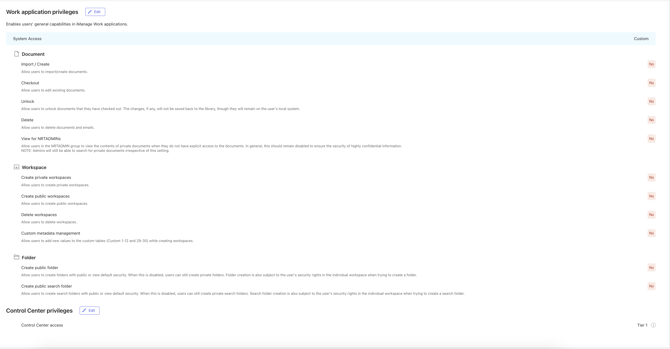
Once the service user has been assigned the Tier 1 Control Center access role, please connect this user to a second connection. In this step, we will request an API token to perform API calls to iManage with the "admin scope". This is why a second connection is required.

When connecting the service user for permissions, please take the following steps:
- Open a private browser
- Login to iManage with the correct service user (the second one for permissions).
- Login to Lexis Create+ Portal with your admin account
- Click on the gear ⚙️ icon and then click "connect admin account". As determined in this article, the user does not have to be an admin, but needs to have the Tier 1 Control Center access assigned.
- This should automatically take the correct active session from iManage.
Go back to the integration guide to follow the next steps of the integration.