![LOGO LEXISNEXIS.png]](https://help.henchman.io/hs-fs/hubfs/LOGO%20LEXISNEXIS.png?height=40&name=LOGO%20LEXISNEXIS.png)
- Open your iManage environment and log in with the Service User (created in this step).
❗ Important you don't have any browser open where you are logged in as a different user. If so, please log out. - Go to Lexis Create+ Portal > Integrations
- and login with your Lexis credentials
- Go to 'Integrations'. Thanks to the preparations an administrator did, as explained in the previous part, you're now able to set up the integration between Lexis® Create DMS and iManage on-premise by clicking on + Connect.
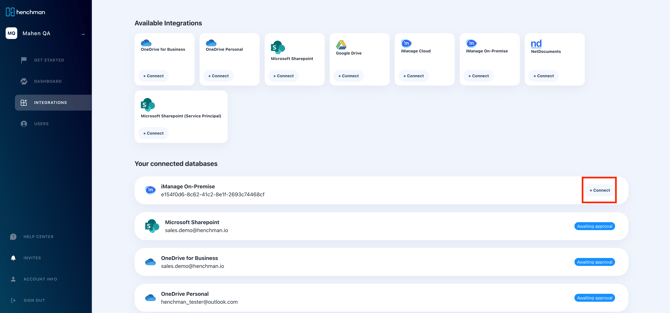
If you're unable to connect your on-prem integration through SSO because of MFA enforcement:
- Create the service account in iManage Control Center and make sure it is a virtual user (This can be done directly via Control Center -> Users -> [User Account] -> Platform Details -> OS Type)
- Before connecting to Lexis® Create DMS, log in with the service account through explicit login https://<your-imanage-url>/login/imanagework.html
- Connect your integration in the Lexis® Create DMS dashboard
6. You will be redirected back to Lexis® Create DMS (If this is not happening, please be sure to enter your Internal URL when setting up the iManage connection). Lexis® Create DMS will start syncing and you will see in the dashboard when the sync is finished. There is no need to keep Lexis® Create DMS or your computer open. At this moment, we will keep an eye on the integration, ensure the right integration settings are applied and let you know when the sync has finished.
If you want to mirror permissions from iManage, some additional steps are needed:
- Open your iManage environment and log in with the Service User (created in this step).
❗ Important you don't have any browser open where you are logged in as a different user. If so, please log out. - Go to Lexis Create+ Portal > integrations
- and login with your Lexis credentials
- click on the ⚙️ next to your connected database > Connect Admin Account.
- You will be directed to the iManage. Fill out the credentials of your service account (❗).
Go back to the integration guide to follow the next steps of the integration.