![LOGO LEXISNEXIS.png]](https://help.henchman.io/hs-fs/hubfs/LOGO%20LEXISNEXIS.png?height=40&name=LOGO%20LEXISNEXIS.png)
When reviewing a contract, you want to quickly identify and understand key terms and conditions mentioned throughout your contract. Good news! Lexis® Create DMS allows you to ask specific questions about your open contract, speeding up the reviewing process.
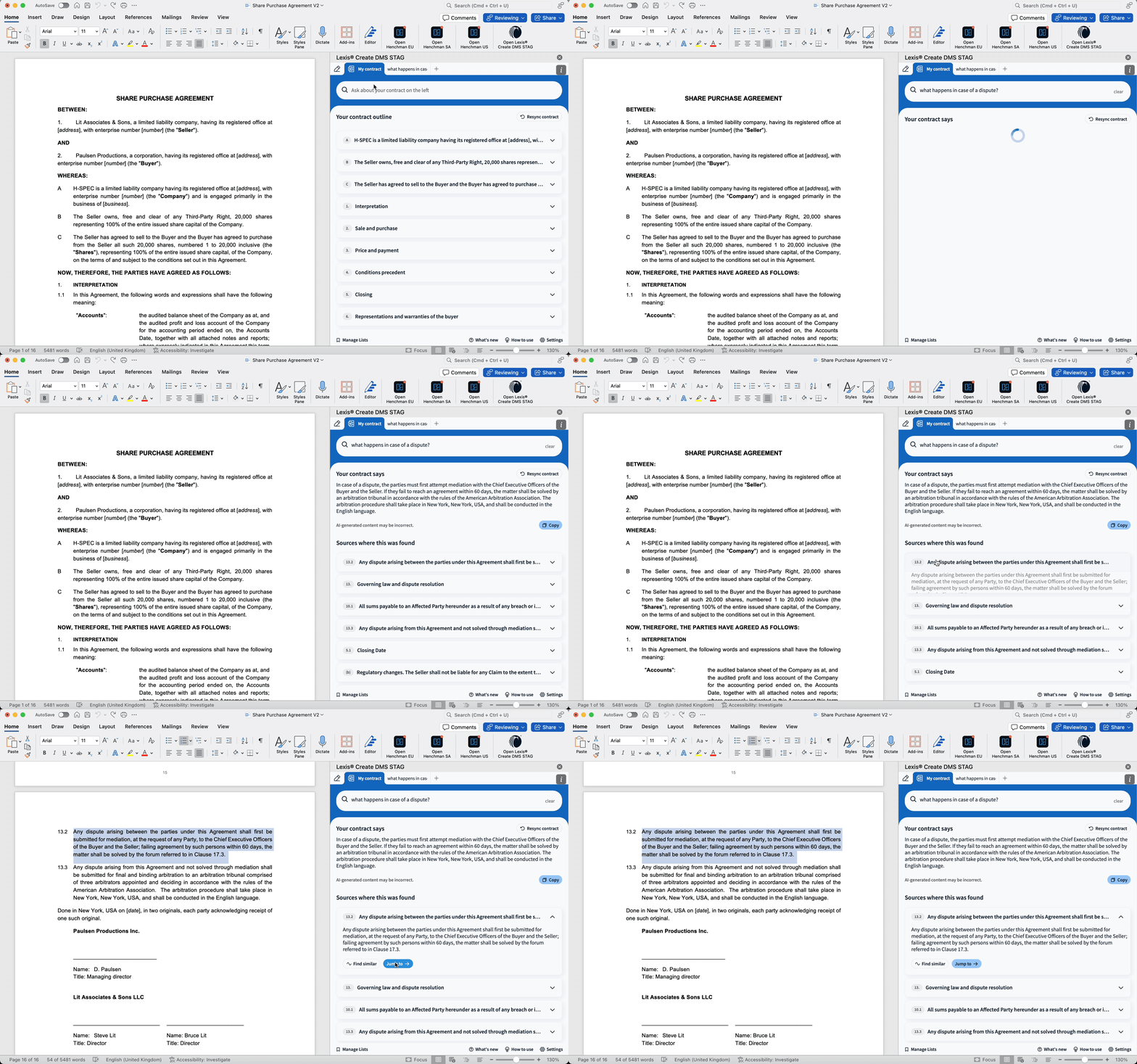
- Open the My contract-button
- Ask any question about the contract you are reviewing, some examples
- 'What happens under this contract in case of a dispute'
- 'What are the limitations of liability for part X'
- 'When will the managers transfer their shares to the sellers'
- Get a summarised answer
- Browse through the list of sources where we found the answer
- Can’t see the My contract-button? This functionality is part of the Lexis® Create DMS AI Assistant module. Contact your customer success manager if you want to get access.
- You can’t see sources listed alongside the answers? If your document doesn’t have a heading structure and is only plain text, then no sources are listed alongside the answers. Learn how to apply a heading structure.
- The functionality ‘My contract’ is not available in the Outlook add-in.
- Whenever you modify your document, a resync of your contract is needed to ensure accuracy in the outline and the answers to your questions. How? Click on the Resync contract button.