![LOGO LEXISNEXIS.png]](https://help.henchman.io/hs-fs/hubfs/LOGO%20LEXISNEXIS.png?height=40&name=LOGO%20LEXISNEXIS.png)
Lexis® Create DMS works as an extension in Microsoft Word and Outlook, and it can be deployed centrally by a Microsoft administrator or downloaded individually from the Microsoft add-in store.
💡 Tip: we highly recommend that your IT department centrally deploys the add-in.
How? Read the article Centrally deploy the Lexis® Create DMS add-in
How can I individually install the Lexis® Create + add-in?
- Open any Word document (docx).
- On the Insert tab, navigate to Get Add-ins and then Store
- Search for Lexis® Create+ and click Add
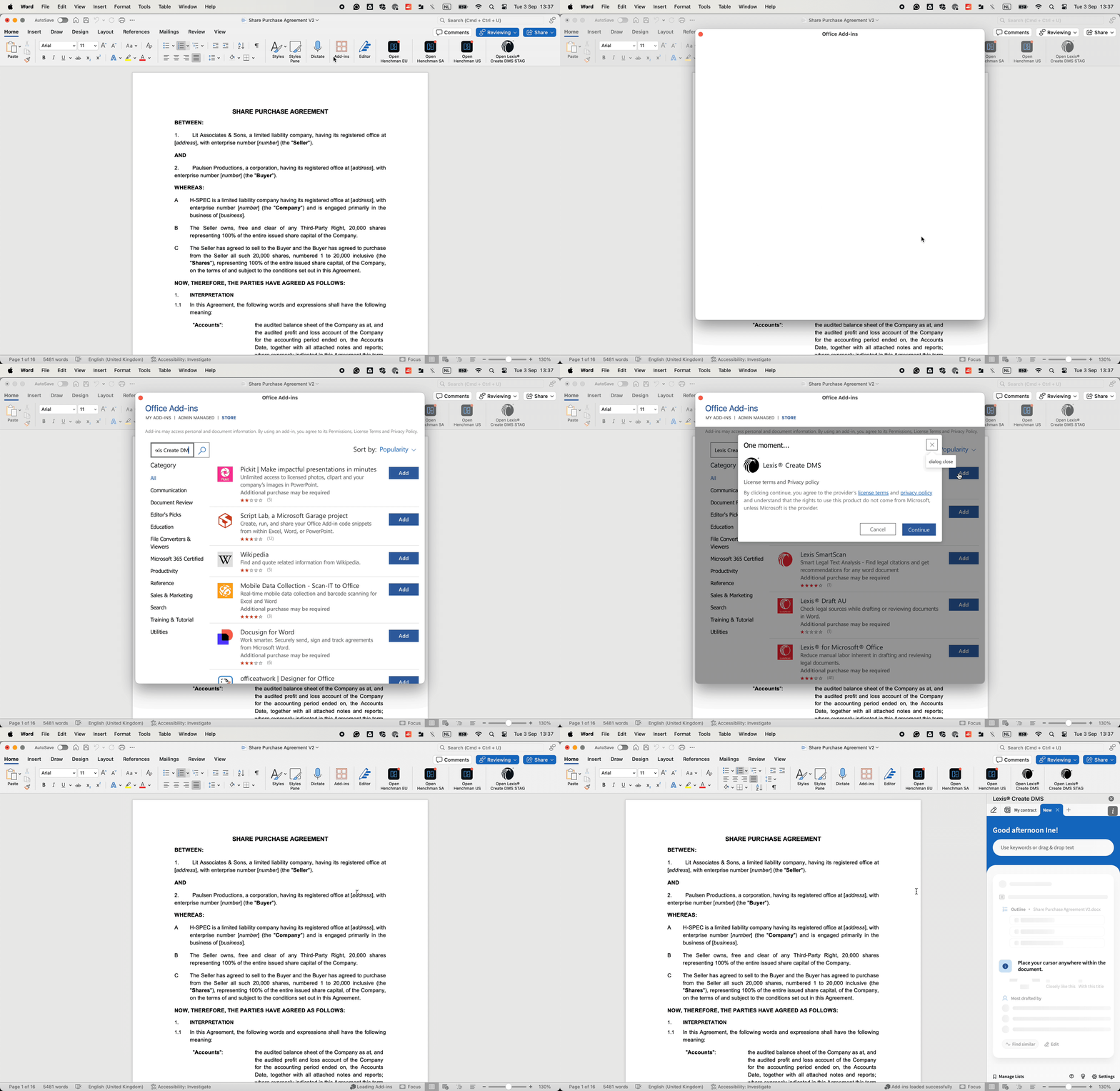
Great! What's next?
- Open a contract you are working on in Microsoft Word
- Click in the Home tab on Open Lexis® Create+ and the add-in will appear on the right side of your screen
- Sign in with your LexisID and password
- Can’t find the Lexis® Create+ add-in? Read the article I don't see the Lexis® Create DMS add-in? to resolve the issue
- Unable to log in? Read the article Problems signing in to resolve the issue