![LOGO LEXISNEXIS.png]](https://help.henchman.io/hs-fs/hubfs/LOGO%20LEXISNEXIS.png?height=40&name=LOGO%20LEXISNEXIS.png)
-
Open the Library Maintenance tool
-
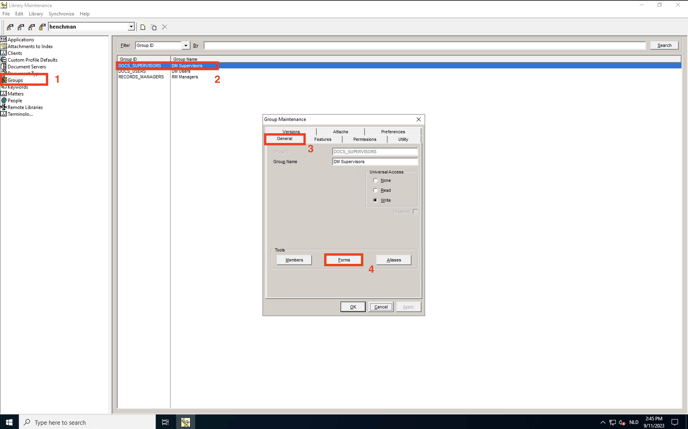
Navigate to the Groups section of the left sidebar
-
Open the primary group to which you’ve added the dedicated service account that will be used to connect to Henchman. (by double clicking it)
-
Select the General tab and click the Forms button that is listed under Tools
-
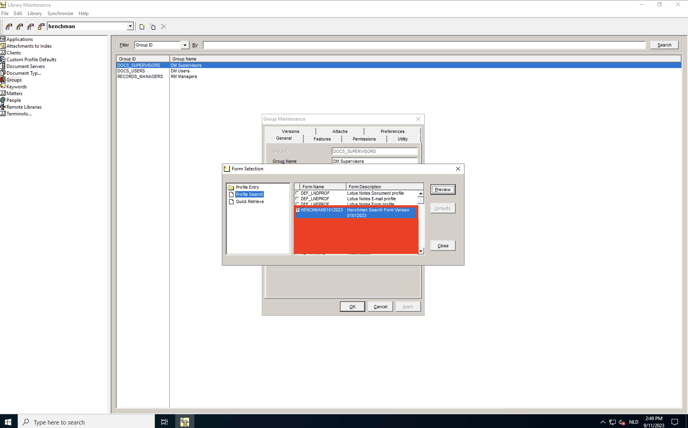
In the left hand sidebar of the Form Selection menu, select Profile Search
-
Toggle the HENCHMAN<version> form to enable it
-
Restart the DM Server & the eDOCS REST API SERVER to make sure the changes are correctly applied
Go back to the integration guide to follow the next steps of the integration.