![LOGO LEXISNEXIS.png]](https://help.henchman.io/hs-fs/hubfs/LOGO%20LEXISNEXIS.png?height=40&name=LOGO%20LEXISNEXIS.png)
Site is not indexed
- On the site, select Settings ⚙️ > Site settings
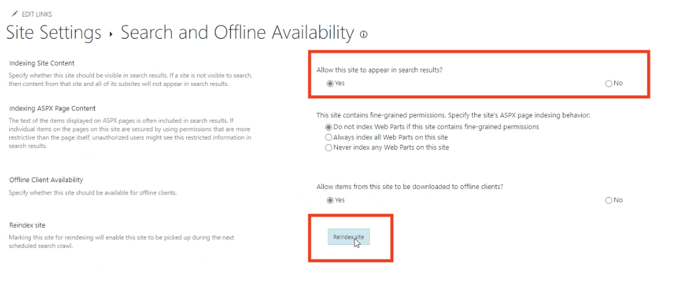
- Under Search > click Search and Offline Availability
- In the Indexing Site Content section, under Allow this site to appear in search results, select Yes.
- In the Reindex site section, click Reindex site.
You can find more info in this and this article from the Microsoft Helpcenter.
Service user assigned to folders and not sites
Lexis® Create DMS will read from the top down, so it needs to be ensure that Lexis® Create DMS has access from the top down. Access can be further restricted, but Lexis® Create DMS needs to start reading at the "site" level. Once Lexis® Create DMS starts reading at the Site level, we will see which drives within the site we can read, then folders etc.
❗It is therefore not possible to only give the service user access to a single folder as the integration will start reading from the "site" level.
Service user has insufficient rights
In case users are managed with Azure, they can connect using our OAuth 2.0 app.
The integration will then automatically ask for the ‘Sites.Read.All’ permission. If the service user is added as a Guest account in Sharepoint, this might not be available and this needs to be manually changed for the service user.
You can read more about the Sites.Read.All permissions in this article. This means that, all sites need to be read, within the access of that user or application.❗So "all" means "all sites that the user or application has access to".
This setting can be found in Azure by navigating to ‘Enterprise Applications’, then opening the ‘Henchman’ Application & finally selecting the ‘permissions’ tab in the left navigation bar
See below marked in red what needs to be enabled:
-png.png?width=688&height=160&name=Screenshot%202023-05-16%20at%2017-09-40%20(1)-png.png)
Documents are checked-out
In some cases because of certain settings of integrations, documents are check-out by default. Checked-out documents cannot be synced to Henchman.