![LOGO LEXISNEXIS.png]](https://help.henchman.io/hs-fs/hubfs/LOGO%20LEXISNEXIS.png?height=40&name=LOGO%20LEXISNEXIS.png)
By leveraging the insights from any clauses’ evolution over time, legal teams can:
- optimize their negotiation tactics
- streamline contract drafting processes
- mitigate risks with unprecedented precision

This is an improved search experience with even more relevant results. Jump through these different versions directly in your search results and track changes (on a horizontal timeline). When before you would get 10 results for a single clause, now you will get these bundled into one search result. You’ll also have the possibility to trace back how a particular clause has been negotiated or amended over multiple rounds of reviewing and negotiation, giving you unique insights into how a clause has been shaped from the first version to final and signed version.
How does it work?
In a nutshell, during the processing of your contracts, we identify clusters of documents that are very similar and apply our “versioning” capability to group clauses together. Not every clause will have versions, it’s most useful for highly negotiated or amended clauses, which in itself may be an interesting insight.
To identify the clusters of documents, we use folder paths, i.e. all files within a folder path are getting a ‘versioning treatment’ to detect and cluster the similar documents. The system will only display the version on the timeline when distinct edits have been made to a clause. Distinct edits means both content and spelling or grammar (e.g. adding or removing a comma).
How to use filters on versioning?
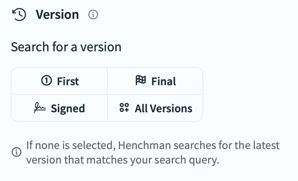
For clauses/definitions with multiple versions, you will also be able to search for a specific version by using our ‘Version Filter’.
- The "First" filter will show the clause with the earliest modified date, the "Last" filter will show the clause with the latest modified date.
- The filter ‘ Signed’ will only show clauses that are coming from contracts that were digitally signed.
If a clause is not versioned, this one clause will be the first version but also the last version, hence filtering will not impact the search results for non-versioned clauses.
If you are using any of the Document Management Systems (DMS) mentioned below, you will benefit from our versioning functionality:
- iManage (Cloud/On-Prem), SharePoint (Cloud/On-Prem), OneDrive, Google Drive or NetDocuments
Out of scope today (last updated, 19 July 2024)
- OpenText eDOCS because the eDocs API just doesn't give us the necessary info so we put everything in 1 drive/folder
- Customers who performed a “data dump” from a local DMS onto a SharePoint or OneDrive, leaving out on the structure folder (just added in 1 drive/folder)
- Only folders up to 500 documents are versioned. For folders > 500 documents, we don’t apply our versioning functionality.
- We don’t support “native” versioning of a DMS, i.e. when users publish different versions within a DMS we only pull in the latest version that is available.
If you have any questions on your set-up or concerning the functionality of versioning, reach out to support.lexiscreatedms@lexisnexis.com.